
The short answer
Two TSA programs exist specifically to remove security friction at the airport. This guide covers both: what they are, what they change, and how to activate each one.
Every business trip runs through the same chokepoint. A security checkpoint standing between you and your gate.
Two TSA programs exist specifically to remove that friction.
This guide covers both, what they are, what they change, and how to activate each one.
What happens at a standard checkpoint
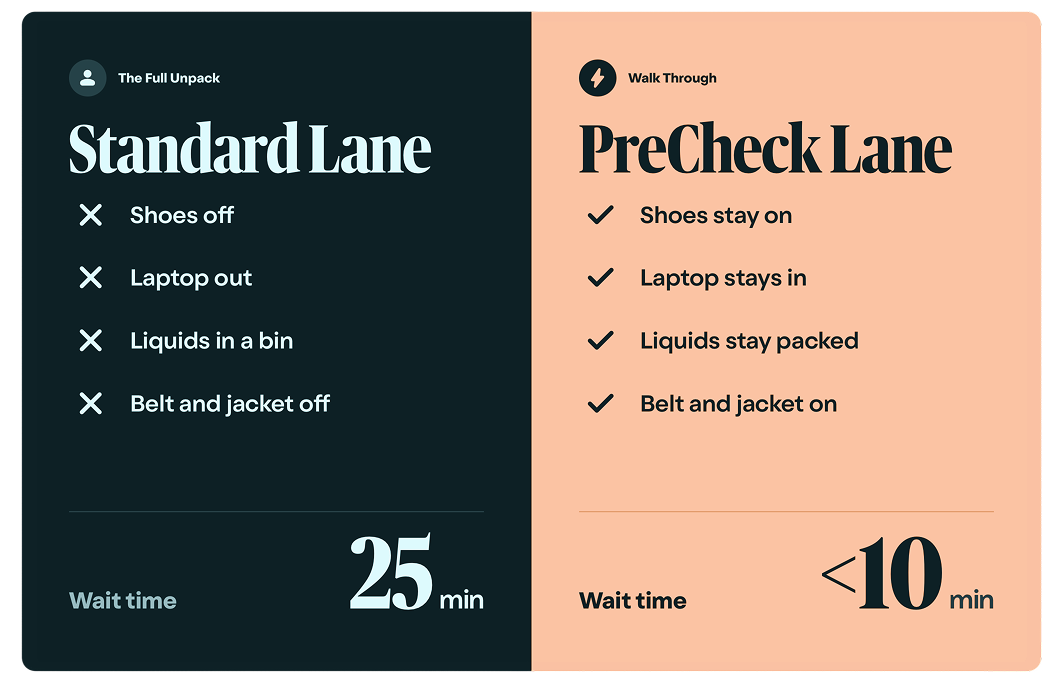
The Transportation Security Administration (TSA) runs security at every commercial airport in the United States. At a standard checkpoint, travelers remove shoes, take laptops out of bags, place liquids in a separate bin, and pass through either a metal detector or advanced imaging technology.
It works. It is just slow. For someone flying ten, twenty, or thirty times a year, those minutes accumulate into something worth paying attention to.
Officers review all items and may conduct additional screening if something needs a closer look.
What TSA PreCheck changes
TSA PreCheck is a trusted traveler program that gives enrolled members access to a dedicated, expedited security lane. Shoes stay on. Laptop stays in the bag. Liquids stay in the carry-on. No unpacking, no delays caused by preparation. Just walk through.
According to the TSA, 99% of PreCheck members wait less than 10 minutes at security. For frequent travelers, those minutes add up across every trip of the year.
Knowing you don’t need an extra thirty minutes of buffer changes how you schedule your morning. That is the part that doesn’t show up in the statistic.
Booking through consumer tools means no priority support line when things break. It means your traveler at the gate, with a cancelled connection, is doing what any leisure traveler does, standing in a line or scrolling through hold music. That's not just inconvenient. For the person who flew 200,000 miles last year to represent your company, it accumulates. It shapes how they feel about the work, the trips, and you.
Traveler experience isn’t a soft metric. It influences retention, productivity, and how readily your best people say yes to the next trip.
How to enroll: three steps, about 15 minutes
Apply online at tsa.gov/precheck
Complete a brief in-person appointment
Receive your Known Traveler Number
1. Apply online at tsa.gov/precheck.
The application takes about five minutes. You will choose one of three TSA-authorized providers (IDEMIA, Telos, or CLEAR) and enter your biographical information.
2. Complete a brief in-person appointment.
This takes approximately 10 minutes and includes document verification, fingerprinting, and a photo. Walk-ins are accepted at many locations, though appointments are recommended.
Fees range from $76.75 to $85 depending on your provider. Many premium travel cards cover this cost as a statement credit, worth checking before you pay out of pocket.
3. Receive your Known Traveler Number (KTN).
Most applicants receive their KTN within three to five days. Add it to your airline profile and every future reservation to activate your PreCheck benefits automatically. Membership is valid for five years.
Already have Global Entry, NEXUS, or SENTRI?
TSA PreCheck is already included with all three memberships. Use your existing membership number as your KTN.
No separate enrollment needed. Add it to your airline profile and you are set.
What TSA PreCheck delivers for frequent travelers
Enrollment takes about 15 minutes. The KTN flows automatically to every booking once it’s in your profile. The benefit renews every five years.
Touchless ID is already live at 65+ U.S. airports and expanding to more each quarter.
Wait time at security
99% under 10 min
According to the TSA, 99% of PreCheck members wait less than 10 minutes at security.
Touchless ID airports
65+
U.S. airports already live, including ATL, DFW, JFK, LAX, and ORD.
Membership validity
5 years
Renew online at a reduced fee. No new in-person appointment required.
Many premium travel cards cover the $76.75–$85 enrollment fee as a statement credit, worth checking before you pay out of pocket.
TSA PreCheck Touchless ID: the next step
PreCheck removes most of the friction at security. Touchless ID removes the rest.
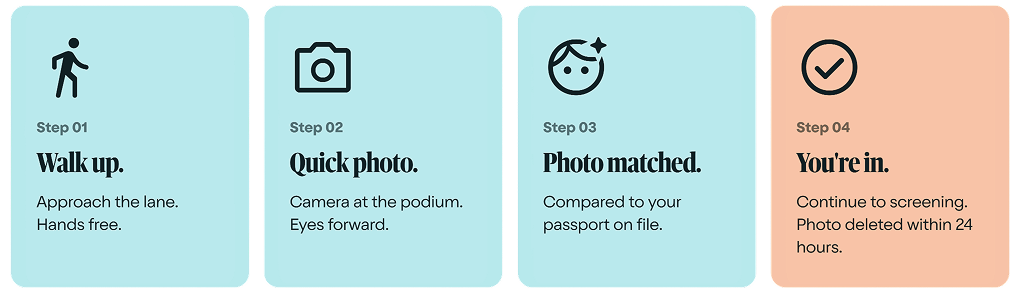
TSA PreCheck Touchless ID replaces the physical ID check at the security checkpoint with facial recognition. A quick photo is taken and matched to your passport on file. No document handed over. No boarding pass scanned. Identity confirmed in seconds.
How to activate Touchless ID
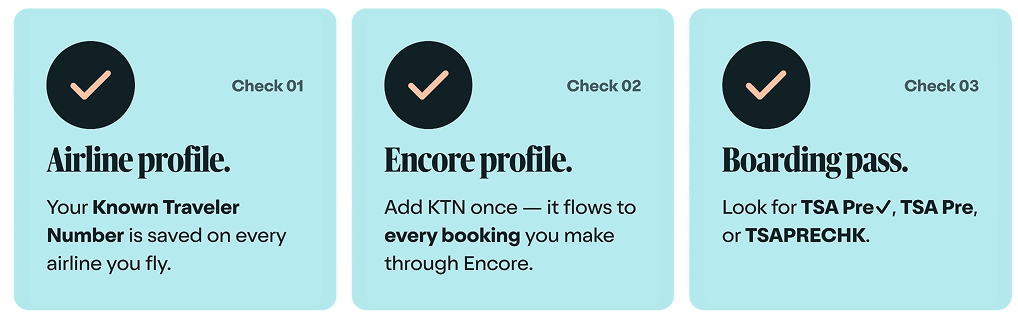
If you are already enrolled in TSA PreCheck, you likely qualify today with no new enrollment required. Three things to confirm:
1. Check your airline profile. Make sure your Known Traveler Number (KTN) is saved there. That is the link that connects you to the program.
2. Update your Encore Platform profile. Add your KTN so it flows automatically to every booking you make through Encore.
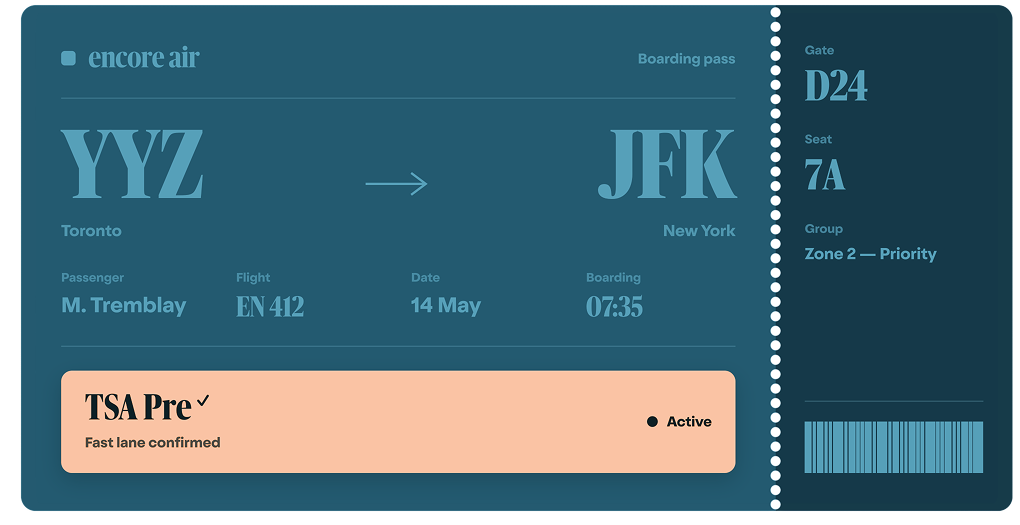
3. Check your boarding pass. Look for TSA PRE, TSAPRECHK, or the TSA Pre✓ logo to confirm it is active.
For the full list of participating airports and airlines, visit tsa.gov/touchless-id.
A few things to keep in mind
- Global Entry and NEXUS holders qualify automatically. Your existing membership number is your KTN.
- Your physical ID still travels with you. Touchless ID speeds up the checkpoint. Your Real ID or passport remains required for the rest of your journey.
- Touchless ID is opt-in. Travelers who prefer the standard process can continue using their physical ID at any time.
- Your photo is used solely to verify your identity at the checkpoint and is deleted within 24 hours of your scheduled departure.
Touchless ID goes one step further by replacing the physical ID check with facial recognition. If you’re already enrolled in PreCheck, you likely qualify today with no new enrollment required.
How to know it is working
Look for TSA PRE, TSAPRECHK, or the TSA Pre✓ logo on your boarding pass. If it is there, you are in the fast lane.
If you have questions about your KTN or your Encore Platform profile, our team is ready to help.
For the full list of participating airports and airlines, visit tsa.gov/touchless-id.